

TL;DR
- AI process automation (APA) combines rule-based automation, machine learning decisioning, and LLM orchestration to automate end-to-end business processes.
- Start with a 90-day pilot: scope a high-volume, low-risk process, measure latency, error rate, and cost per transaction, then iterate toward production.
- Choose vendors by security, data residency, connector breadth, and model governance; compare seat, usage, and outcome pricing.
- xproductlist.com helps you shortlist ai process automation tools and compare pricing and connectors so you can pick the fastest path to value.

Introduction — why AI process automation matters in 2026
AI process automation is the set of methods and tools that combine classic automation with machine learning and large language models to run business processes end-to-end with minimal human touch. In a practical sense, it means replacing repetitive human steps (data entry, triage, classification) and partial decision tasks (credit scoring, routing, summary generation) with systems that can perceive inputs, decide, and act across apps and APIs.
Search interest (site GSC) shows ~177 impressions for “ai process automation” with near-zero CTR — indicates topic-market mismatch we will fix with targeted pillar + how-to content. That stat proves there’s demand but not yet clear, actionable content on xproductlist.com that procurement teams in the US, EU, and APAC will click.
- US: buyers care about procurement rules, Fed/State compliance, and vendor SLAs.
- EU: GDPR and data residency are primary procurement filters for automation vendors.
- APAC: local hosting and region-specific regulatory considerations matter for deployments.
This guide explains what APA is, how it differs from RPA, the technologies that power it, enterprise use cases, pricing patterns, vendor evaluation checklists, and a 90-day pilot playbook you can copy. Throughout, I point to how xproductlist.com helps you quickly compare AI process automation tools, connectors, and pricing notes so you skip vendor marketing and choose tools that match your real constraints, including insights on how to evaluate AI process automation vendors.
When not to implement AI process automation
When outputs can’t be reliably validated or audited, don’t move to APA. When data changes faster than you can retrain models, don’t automate. When per-transaction cost after automation exceeds the value created, pause. When regulatory rules forbid automated decisioning without human oversight, postpone until governance is in place. When your team cannot instrument monitoring or respond to failures within SLA, avoid productionizing the automation.
An AI prototype is production-ready only when failures are predictable, recoverable, and cheaper than the value the system delivers.
What is AI process automation? Definitions and core components
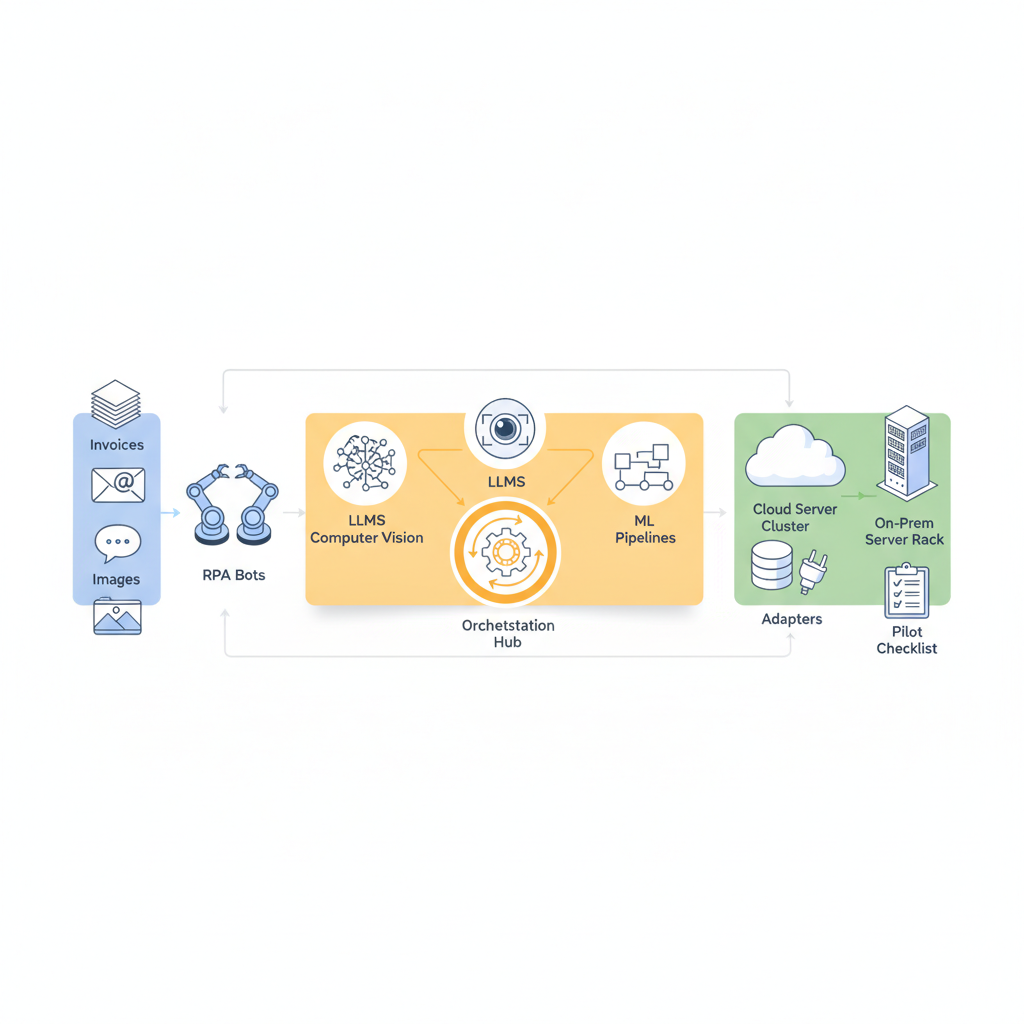
AI process automation (APA) is the integration of three capabilities to automate business processes: rule-based execution (the automation backbone), machine learning decisioning (statistical models that choose actions), and large language model orchestration (LLMs that interpret text, generate responses, and coordinate flows). APA extends classic process automation by accepting fuzzy inputs (handwritten forms, emails, images) and producing human-like outputs (summaries, explanations, natural-language responses) while still connecting back to enterprise systems. For more on this, see Ai process automation pilot plan guide.
Core components of an APA solution include:
- Connectors and integrations: prebuilt adapters to SaaS apps, databases, and APIs that let automations read and write data.
- Orchestration layer: a workflow engine that sequences actions, retries failures, and logs transactions.
- Perception models: OCR or computer vision pipelines that extract structured data from documents and images.
- Decisioning models: classifiers, regressors, or ranking models that decide the next action and confidence thresholds.
- LLM layer: for generating text, normalizing language, or executing complex semantic tasks where rules fall short.
- Monitoring and governance: drift detection, audit logs, access controls, and human-in-the-loop fallbacks.
Example: an invoice processing APA uses an OCR model to extract invoice fields, an ML classifier to map line items to GL codes, an LLM to reconcile ambiguous vendor names from free-text fields, and an orchestration layer to create matching entries in the ERP. The system marks low-confidence invoices for human review and auto-posts confident ones. That combination reduces manual touchpoints while keeping controls.
Actionable takeaways: Inventory the inputs (forms, emails, images) and outputs (ERP entries, tickets), then map which of the core components above you need. Use xproductlist.com to filter ai process automation tools by connector coverage and OCR capabilities so you don’t pick a tool that forces custom integration work.
Difference between RPA, intelligent automation, and AI-driven automation
RPA (robotic process automation) automates repetitive GUI-driven tasks using scripts or UI-level bots. It’s deterministic: if the UI and data don’t change, bots succeed. Intelligent automation adds limited AI — rules plus simple ML classifiers — to handle exceptions and enhance throughput. AI-driven automation moves decisioning into statistical models and LLMs that understand semantics and adapt to variable inputs.
Concrete distinctions:
- RPA: best for fixed-screen workflows like copying data between legacy systems. Failure modes are UI changes and brittle selectors.
- Intelligent automation: uses small ML models or pattern matching to reduce exceptions — for example, auto-classifying email types before routing.
- AI-driven automation: uses modern ML pipelines and LLMs for perception and natural-language tasks — for example, extracting insights from contracts and drafting redlines.
Example: if your needs are strictly screen-scraping and scheduled data moves, RPA is faster and cheaper. If you have fuzzy text, documents, or complex decision rules, choose ai process automation that combines ML and orchestration. For xproductlist.com readers, evaluate rpa vs ai process automation by mapping current failure rates and exception volume — high exception rates favor AI-driven approaches.
Key technologies powering AI process automation (LLMs, computer vision, ML pipelines, orchestration)
Four classes of technology form the technical spine of modern APA: large language models, computer vision and OCR, ML pipelines and feature stores, and orchestration engines. Each plays a different role but must work together for production reliability.
Large language models (LLMs) handle semantic tasks: parsing emails, generating responses, summarizing long texts, and extracting entities from noisy language. In process automation they're often used for intent detection, classification when labeled data is sparse, and as a fallible but fast human-like decision layer.
Computer vision & OCR extract structured data from images and PDFs. Modern Document AI pipelines include layout analysis, table extraction, and entity normalization. Practical threshold: for typical invoices, aim for field-level precision above 95% before enabling full auto-posting; otherwise keep a human review step.
ML pipelines include data preprocessing, feature extraction, model training, and evaluation. Pipelines should support A/B tests, canary rollouts, and monitoring for data drift. Use model registries and version artifacts so you can roll back to known-good models quickly.
Orchestration and workflow engines sequence steps, handle retries, and provide observability. Key features to demand: human-in-the-loop handoffs, conditional branching by confidence score, and distributed transaction support when multiple systems must be updated atomically.
Example stack: a Document AI extractor (OCR + layout) feeds a classifier (ML pipeline) that sets confidence. If confidence < 0.8, the orchestration engine routes the transaction to human review; if confidence >= 0.8, an LLM normalizes vendor text and the orchestration engine posts to the ERP. This design yields predictable failure modes and transparent audit trails.
Actionable takeaways: define acceptable confidence thresholds (e.g., P95 confidence >= 0.8 for auto-execution), require model registries, and choose orchestration with human-in-loop APIs. Use xproductlist.com to compare ai process automation tools by whether they include Document AI, model registries, and orchestration features in one product or require composing multiple vendors.
Monitor model performance continuously; silent model decay is the common path from automation success to production outage.
Top enterprise use cases by function (finance, customer service, HR, devops, marketing)
AI automation use cases span functions. Below are high-value, high-frequency examples where automation buys time back for knowledge workers and improves consistency.
- Finance: invoice capture and matching, accounts payable triage, expense report auditing, and automated reconciliation. Example: use Document AI to extract invoice lines and an ML model to detect duplicate invoices before posting.
- Customer service: automated ticket triage, suggested responses, and knowledge-base article generation. Example: LLMs generate draft replies for agents and orchestration tools push high-confidence replies directly to customers.
- HR: resume parsing, candidate shortlisting, employee onboarding document processing, and policy compliance checks. Example: ML classifiers score applicants by fit, then automation schedules interviews and sends onboarding packets.
- DevOps: incident classification, automated runbook execution for low-risk incidents, and log triage. Example: classifiers prioritize alerts and trigger automated remediation playbooks for known issues.
- Marketing: content generation, lead enrichment, and campaign setup. Example: LLMs draft ad copy and automation populates campaign templates across advertising platforms using connectors.
Actionable takeaways: prioritize processes with high volume, repetitive effort, and measurable outcomes (cost saved, time saved, error rate reduced). For each candidate process, calculate current manual cost per transaction and set a target post-automation cost (for example, a 60% reduction). Use xproductlist.com to filter ai automation use cases by vendors who list relevant features like Document AI or prebuilt marketing connectors.
How vendors differ — product types and feature sets
Vendors in the APA space fall into several categories: RPA-first vendors adding AI modules, cloud-native Document AI vendors, orchestration-first platforms with optional ML, and specialized LLM orchestration platforms. Differences show up in connector libraries, embedded models, deployment options, and governance features.
Key product-level distinctions:
- Connector depth: some vendors offer 200+ prebuilt connectors (ERP, CRM, cloud storage); others provide an SDK and expect you to build custom integrations.
- Embedded AI vs bring-your-own-model: vendors either bundle OCR/ML/LLM capabilities or let you wire your own models through APIs. Bundled models speed pilots; BYOM gives more control and may ease compliance.
- Observability and MLOps: look for model registries, feature stores, and drift detection. Platforms without MLOps will force you to build monitoring around your models.
- Human-in-loop tooling: some products include workbench UIs for reviewers and operator controls for reruns and corrections.
- Governance and compliance: data masking, audit trails, role-based access, and consent controls differ widely and affect procurement.
Example: an RPA-first vendor may excel at desktop automation and offer simple ML add-ons for classification. A Document AI specialist excels at extracting complex tables and layouts. An orchestration-first vendor will have stronger human-in-loop and retry semantics. Your choice depends on whether your primary constraint is integration breadth, document complexity, or governance.
Actionable takeaways: create a shortlist that maps your top three requirements (connectors, document accuracy, governance). Use xproductlist.com to compare ai process automation tools against those axis quickly, and flag vendors that match at least two of your requirements to move into trial.
On-prem vs cloud vs hybrid deployments
Deployment choice affects security, latency, and cost. Cloud deployments are fastest to start and scale; on-prem keeps data inside your network and simplifies some regulatory constraints; hybrid gives a middle path for sensitive workloads while using cloud services for non-sensitive parts.
Concrete examples of decisions:
- If you process regulated personal data and need strict data residency, prefer on-prem or a vendor with EU-only cloud regions.
- If latency under 200ms matters for interactive automations, evaluate regional cloud footprints or edge deployment options.
- If you expect bursty usage, cloud usage-based pricing often lowers cost compared with fixed-seat on-prem licensing.
Actionable takeaway: list your compliance constraints and measure average request latency needs. Ask vendors for architecture diagrams that show where data is processed and whether models run in your VPC or across vendor-managed endpoints.
Prebuilt connectors & workflow builders
Prebuilt connectors reduce integration time. Workflow builders provide visual editors to model branching, retries, and human checkpoints. Together they shrink pilot timelines from months to weeks when available for your stack.
Example: if your process requires ERP, CRM, and SSO integration, verify the vendor supports all three natively. If not, plan engineering time: building a custom connector can take 2–6 weeks depending on APIs and authentication complexity.
Actionable takeaway: during evaluation, run a simple end-to-end test with the vendor’s connectors rather than assuming they work — test authentication, field mapping, and error behavior. Capture the exact API calls and error messages for your engineering backlog.
Pricing models and cost considerations (seat, usage, transactions, outcomes)
Pricing in APA generally follows four models: per-seat, usage-based (compute and API calls), per-transaction (per automation run), and outcomes-based (pay for results like approved invoices). Vendors often mix models: seats for the orchestration UI plus usage bills for model calls.
Cost drivers to watch:
- Model invocation costs: LLM and OCR calls can become the largest variable cost for high-volume workflows.
- Connector and maintenance costs: unsupported connectors increase engineering effort and long-term TCO.
- Support and SLA tiers: enterprise SLAs usually add 10–30% on top of base license fees.
- Data egress and storage: cloud deployments may add storage and egress fees for documents and logs.
Example pricing scenarios:
- Small automation: single-seat orchestration + a low volume of OCR calls — predictable monthly spend, minimal infra cost.
- Scale automation: multiple seats, heavy LLM usage, and large document storage — usage costs dominate and require budgeting and quotas.
Concrete recommendation: during pilots, set a monthly spend cap and monitor model call volume daily. Negotiate sample overage terms during procurement and require a billing dashboard that breaks out model, connector, and seat costs.
How to evaluate vendors — checklist (security, data handling, latency, extensibility)
Use the checklist below to evaluate vendors methodically. Rate each vendor on the same scale and require evidence for claims.
| Criteria | Why it matters | Minimum acceptance |
|---|---|---|
| Security certifications | Assures basic controls | ISO 27001 or SOC 2 Type II |
| Data residency | Regulatory compliance | Region-specific hosting or private cloud |
| Model governance | Traceability and rollbacks | Model registry and audit logs |
| Connector coverage | Integration speed | Native connectors for core systems |
| Latency | User experience for interactive flows | P95 < 300ms for interactive steps (typical SaaS target) |
| Extensibility | Future-proofing | Public APIs and SDKs |
Actionable takeaways: request a vendor risk package with SOC reports, architecture diagrams, and a live demo using a sample of your data. Score vendors on the checklist and eliminate any that fail critical items like data residency or model governance.
Pilot & implementation playbook (90-day to pilot-to-production path)
A focused 90-day pilot accelerates learning while limiting cost. The goal is not to automate everything but to prove a repeatable path to production with clear metrics and governance.
90-day roadmap (high-level):
- Days 0–14: Discovery and scope. Map process, input/output artifacts, and baseline metrics.
- Days 15–45: Build the prototype. Wire connectors, train minimal models, set confidence thresholds, and implement a human review UI.
- Days 46–75: Run the pilot in shadow mode or with partial automation. Collect metrics, measure exceptions, and refine thresholds.
- Days 76–90: Harden for production. Add monitoring, rollback paths, and operational runbooks. Sign-off for production rollout.
Concrete example: for automating invoice triage, the prototype includes sample invoice ingestion, OCR extraction, GL mapping model trained on historical invoices, and an orchestration flow that posts to a sandbox ERP. In shadow mode, the automation runs but does not change the ERP; operators review mismatches and annotate corrections. After three weeks of stable P95 accuracy > target, move to controlled production with a 10% initial automation rate and human review for the rest.
Actionable takeaways: require a shadow mode test phase, instrument data collection for every decision, and define rollback criteria up front (e.g., spike in exception rate > 3x baseline triggers rollback). Use xproductlist.com to find vendors with built-in shadow-mode capabilities and audit logs.
Run pilots in shadow mode until you can measure and predict failure modes; human reviewers are your production safety net.
Scoping the pilot, sample backlog, success criteria
Scoping must be precise: pick a single end-to-end subprocess, list input types, expected throughput, and current manual cost. Create a sample backlog of 20–100 representative cases to train and test models.
Sample pilot backlog items:
- 10 invoices with unusual vendor formats
- 5 multi-page invoices with tables
- 5 low-quality scans and 5 clear PDFs
Success criteria (example):
- Field extraction precision > 95% for invoice number and total.
- Auto-posting rate reaches 70% without human correction after two weeks.
- Operator throughput improves by 40% (measured as processed items per hour).
Actionable takeaway: freeze success criteria before starting and insist vendors show how they’ll measure each metric. Put the acceptance criteria into the pilot contract to avoid scope creep.
KPIs, measurement, and ROI frameworks for automation programs
Measure APA with a mix of performance, business, and quality KPIs. Don’t use vanity metrics; pick metrics tied to business outcomes.
Recommended KPIs:
- Throughput: transactions processed per hour.
- Automation rate: percent of transactions completed without human intervention.
- Error rate: percent of automated transactions that need manual correction.
- Cycle time: average time from input to completion (P50/P95).
- Cost per transaction: all-in cost including seats, model calls, and engineering amortization.
- Time to detect drift: median time between model degradation and alert.
ROI framework (simple): Estimate annual manual labor cost for a process, subtract projected post-automation costs (model/compute + vendor fees + reduced headcount), and include implementation amortized over 1–3 years. Use conservative assumptions for automation rate and error recovery time.
Concrete thresholds to track: aim to reduce cost per transaction by >40% in the first year for a business case that pays back implementation within 12–36 months. If your projected payback exceeds 36 months, re-scope to a smaller pilot or postpone productionization.
Governance, contracts, and vendor negotiation pitfalls
Governance must cover data handling, model risk, auditability, and contractual clarity. Common procurement pitfalls include vague SLAs, unclear data ownership, and missing audit requirements for model behavior.
Contract items to insist on:
- Explicit data residency and processing clauses with region-level options.
- Audit log retention policies and access for your security team.
- Clear definitions of supported connectors and who maintains them.
- Exit plan: data export formats and deletion timelines.
- Performance SLAs for orchestration and model response latency.
Negotiation pitfalls to avoid: agreeing to opaque pricing for model calls, accepting single-region hosting where you need multi-region, or ignoring indemnity clauses for automated decisioning that affects customers. Ask for a technical addendum that covers observability, model retraining cadence, and escalation procedures for incidents.
Actionable takeaways: involve procurement, security, and legal early; demand sample audit logs and architecture diagrams; and make acceptance criteria part of the contract rather than a conversation to have later.
Regional considerations and procurement tips (data residency, compliance)
Procurement for APA must map to regional compliance regimes. In the EU, GDPR drives data residency and legal basis for automated processing. In the US, industry-specific rules (healthcare, financial services) impose additional controls. APAC has diverse regulations — some markets demand local hosting.
Procurement tips:
- Ask vendors for region-specific hosting options and whether models run in a customer VPC.
- Request documentation on data flows: which data leaves your tenant, how long it’s stored, and how logs are purged.
- Include compliance attestations and require periodic SOC/ISO reports during RFP evaluation.
Example: if you operate in both the EU and US, prefer vendors that support per-tenant regional controls so EU data never traverses non-EU regions. If a vendor refuses to sign a regional data processing addendum, escalate to legal immediately.
Comparison matrix: top tool categories and recommended vendors (table)
The table below compares categories of tools and recommended vendor attributes. Use it to map which category suits your needs before shortlisting vendors.
| Tool category | Strengths | Weaknesses | When to choose |
|---|---|---|---|
| RPA-first platforms | Fast GUI automation, mature orchestration | Brittle with documents, weaker ML | Desk automation, legacy screens |
| Document AI specialists | High-accuracy extraction, table parsing | May lack broad connectors | Document-heavy workflows |
| Orchestration-first platforms | Human-in-loop, rollback, enterprise governance | Requires external ML for perception | Complex branching with regulated data |
| LLM orchestration platforms | Advanced language tasks, context-aware flows | Model governance and cost management needed | Semantic tasks and customer-facing text |
Actionable takeaway: pick the category that solves your primary bottleneck; then use xproductlist.com to compare vendors in that category by specific features like connector count, Document AI capabilities, and governance controls.
Quick-start templates and resources (scorecards, pilot plan templates)
Below are two reusable artifacts you can copy into your project plan: a vendor scorecard and a pilot plan checklist. Use them to run vendor comparisons and keep pilots on track.
| Vendor scorecard item | Notes / scoring |
|---|---|
| Security & certifications | Score 0–5 |
| Connector coverage | List core systems; score 0–5 |
| Document AI quality | Field-level precision on sample docs |
| LLM capabilities | Normalization, summarization, cost per call |
| Governance & audit | Model registry, logs, role controls |
| Total cost estimate | Annualized seats + usage + infra |
Pilot plan checklist (copy):
- Define scope and success criteria
- Collect representative sample data (20–100 items)
- Run prototype in shadow mode
- Monitor KPIs daily, weekly, and monthly
- Document rollback and escalation paths
Actionable takeaway: copy these templates into your project tracker and require vendors to fill the scorecard during RFP responses. Use scorecard rankings to pick two vendors for proof-of-concept trials.
Actionable next steps — choosing the right first project
Choose your first project using this decision rule: select a process with high volume, clear inputs and outputs, and low regulatory risk. Prefer processes where manual effort is concentrated in a small team so you can measure impact quickly.
Concrete short list to evaluate first project candidates:
- Invoice triage and AP matching
- Customer support triage and templated responses
- Onboarding document processing
Step-by-step selection process:
- Map current manual cost per transaction.
- Estimate achievable automation rate and set conservative targets.
- Run a 90-day pilot with shadow mode and defined acceptance criteria.
- Measure ROI and operationalize the automation with runbooks.
Actionable takeaway: start small, instrument everything, and require a measurable payback within 12–36 months. Use xproductlist.com to shortlist ai process automation tools that list pilot-case studies similar to your use case.
Appendix: glossary, links to deeper guides and checklists
Glossary (short):
- APA: AI process automation.
- LLM: large language model used for semantic tasks.
- Orchestration: the workflow engine that sequences automation steps.
- Shadow mode: running automation without changing production systems to collect metrics safely.
FAQ
What is ai process automation? AI process automation is the combination of rule-based automation, machine learning decisioning, and LLM orchestration that together automate end-to-end business processes involving variable inputs like documents and free text.
How does ai process automation work? AI process automation uses connectors to ingest data, computer vision or NLP models to extract structured information, decision models to choose actions, and orchestration engines to sequence tasks, handle retries, and log outcomes.